In regulated environments, an unlogged ticket is a liability that devalues your M&A readiness. Selecting IT help desk support services requires a shift toward revenue-grade accountability. When audit pressure mounts and queues pile up, you need a defensible selection framework. These 9 criteria prioritize service-based intent over basic ticketing features. We begin with the primary fork in the road: managed services versus software.
Key Takeaways
- In regulated environments, an unlogged ticket is a liability that devalues M&A readiness, so selecting IT help desk support requires revenue-grade accountability over basic ticketing features.
- Decide your operating model first: outsourced help desk (humans and processes run by an MSP), ITSM software your team runs, or a hybrid of outsourced staffing on your own ticketing instance.
- Demand operational evidence over marketing claims: a signed Business Associate Agreement, SOC 2 Type II report, least-privilege access, and audit logging, not HIPAA-readiness promises.
- Prioritize Time-to-Restore SLAs over first-response vanity metrics, since fast acknowledgment does nothing for a business facing missed regulatory deadlines.
- Require a phased 90-day implementation that defines included onboarding versus billable project work, because instant deployment is a marketing myth that creates configuration debt.
1. Distinguish Between Service Delivery and Tooling
Searching for help desk support services often leads to software pricing, but tools are not staff. You must decide on an operating model before vetting vendors to avoid category errors that leave your team unsupported.
Choose your delivery model:
- Outsourced Help Desk: Professional humans and processes managed by an MSP.
- ITSM Software: Tooling your internal team runs.
- Hybrid: Outsourced staffing delivered on your ticketing instance.
Ask these fit-test questions:
- Do you need 24/7 coverage or internal Tier 2/3 capability?
- Is process maturity and auditability more critical than ticket speed?
Request a Scope of Work (SOW) explicitly defining coverage for endpoints, network, identity, and cloud apps. This prevents buying a platform when you actually require staffing.
2. Demand Evidence Over Compliance Marketing
If your provider claims HIPAA readiness but cannot produce a signed Business Associate Agreement (BAA), your audit success is at risk. Reliable IT help desk support services require operational artifacts over marketing promises. You must verify:
- Least-privilege access and MFA/SSO
- Comprehensive audit logging for system changes
- Documented incident and data handling procedures
Request a SOC 2 Type II report, pen test summary, and data retention policies. For healthcare, specifically ask how they prevent PHI sprawl in ticket comments. The decision rule is absolute: if a vendor withholds security evidence pre-sales, expect audit friction post-signature. This vetting process shifts the burden of proof to the vendor, protecting your EBITDA from regulatory fines and ensuring investor-grade M&A readiness.
3. Codify Accountability with Outcome-Based SLAs
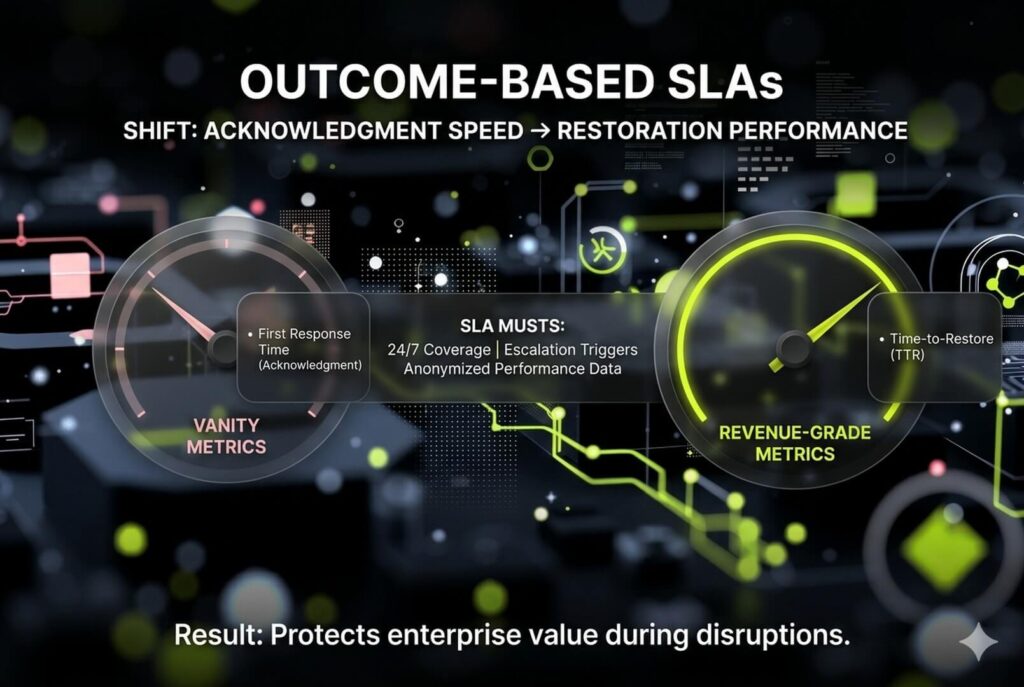
Standard service level agreements are often vanity metrics that protect the provider rather than your uptime. While competitors prioritize first response times, demand Time-to-Restore (TTR) targets. A fast acknowledgment does nothing for a business facing missed regulatory deadlines or patient care disruption.
Your SLA must define:
- Hours of support (business hours vs. 24/7)
- Support channels
- Response times by severity
It must identify triggers for Tier 2/3 escalation, specifying who gets paged and how status updates are delivered. Before signing, request a sample SLA and anonymized performance reporting from the previous quarter. This vetting ensures your IT help desk support services protect EBITDA and long-term enterprise value.
4. Verify Technical Escalation and Tiered Support Structure
Vague tiered support is a liability during compliance audits. If an IT help desk support services provider cannot define exactly who handles data at each level, expect slow escalations and hidden project fees.
Demand a granular breakdown of their service model:
- Tier 1: Intake, triage, and standard fixes like password resets.
- Tier 2: Advanced endpoint, application, and network troubleshooting.
- Tier 3: Engineering, root cause, and vendor coordination.
Ask what percentage of tickets resolve at Tier 1 and identify named roles providing Tier 2 and 3 depth. This transparency ensures investor-grade accountability and protects enterprise value by ensuring escalation paths are real, staffed, and priced.
5. Prioritize Integration Depth Over Surface-Level Feature Lists
Many IT help desk support services treat integrations as vague checkboxes. This leads to fragmented data and swivel-chair workflows that compromise audit trails. In regulated environments, integration depth determines technical authority and identity control.
Verify these minimum surfaces before signing:
- Identity: SSO/MFA (Okta or Azure AD) for role-based access.
- Collaboration: Slack or Microsoft Teams for ticket intake and alerts.
- Work Tracking: Jira for engineering alignment.
Ask specifically which integrations are native versus middleware and request their standard implementation sequence to ensure a predictable rollout. These connections eliminate handoff friction to ensure cleaner audit trails and faster MTTR for investor-grade scrutiny. This strategy secures your daily workflows without breaking identity or compliance controls.
6. Enforce Technical Guardrails for Data Privacy and PHI Handling
Ticket queues are often hidden liabilities for data leakage. Analysts who paste screenshots containing PII into free-text fields create unencrypted trails that fail audits. High-value IT help desk support services prevent this via strict ticket hygiene:
- Restricted queues for sensitive issue siloing.
- Redaction templates to standardize what is never pasted.
- Direct link-outs to encrypted systems instead of storing PHI in plaintext.
Request a permission model detailing analyst approval and revocation processes. An investor-ready workflow uses Role-Based Access Control (RBAC) to ensure only authorized personnel view specific queues. This protects your firm from improper access and preserves enterprise valuation during M&A due diligence.
7. Operationalize Governance with Audit-Ready Reporting
Standard dashboards often track vanity metrics rather than defensible audit trails. For regulated firms, IT help desk support services must deliver documentation that satisfies executive reviews and external auditors.
Operationalize governance by tracking a KPI set that measures Tier 1 effectiveness and backlog health:
- SLA attainment by priority and MTTR
- Backlog aging and reopen rates
- First-contact resolution (FCR)
Ensure you can produce audit artifacts on demand, including access logs, change records, incident postmortems, and ticket history retention. If reporting cannot be exported for Quarterly Business Reviews (QBRs), the relationship becomes opinion-driven. This lack of transparency creates a technical authority gap that compromises M&A readiness and the ability to prove control effectiveness.
8. Audit AI Copilot Governance and Data Privacy Guardrails
Competitors often pitch AI as a panacea without disclosing data destinations. For regulated firms, AI must remain a productivity aid rather than an autonomous agent. Professional IT help desk support services leverage AI to:
- Summarize ticket histories and suggest responses.
- Route or escalate issues and surface knowledge articles.
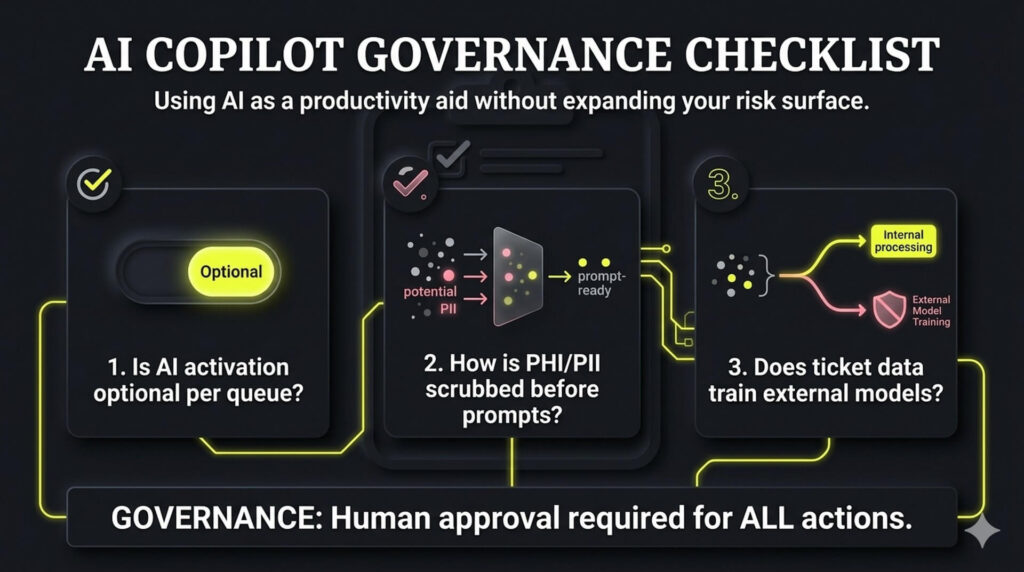
Governance requires human approval for actions, role-based limits, and logging of all AI-assisted changes. Use these procurement questions to capture efficiency gains without expanding your risk surface or compromising M&A readiness:
- Is AI activation optional per queue or client?
- How is PHI/PII scrubbed before entering prompts?
- Does our ticket data train external or provider models?
9. Demand a Phased Implementation Plan with Commercial Safeguards
Instant deployment is a marketing myth that creates configuration debt. High-authority IT help desk support services require a structured 90-day roadmap to ensure investor-grade implementation. Prioritize time-to-value through three specific phases:
- Day 30: Core workflows, SSO/MFA, priority queues, and SLA configuration.
- Day 60: Reporting cadence, tool integrations, and critical data migrations.
- Day 90: Knowledge base maturity, escalation tuning, and security/compliance reviews.
Protect your EBITDA by explicitly defining included onboarding versus billable project work in the contract. This phased approach mandates agent training and strategic end-user intake guidance to prevent technical drift. Controlled rollouts ensure the service becomes operationally stable and audit-ready fast, securing the investor-ready enterprise value required for successful M&A due diligence.
Where this fits in your MSP growth system
This is one piece of how NUOPTIMA makes MSPs and cybersecurity firms the provider buyers find on Google and in AI search. See how it connects to MSP SEO and GEO and AI-search, or get your free MSP lead forecast to see exactly where your firm shows up across ChatGPT, Gemini, and Perplexity today.