When systems fail, buyers do not browse. They hunt. Prospects search for remote IT support needing immediate resolution to a business-stopping crisis. To capture this high-intent traffic, your MSP must signal safety and speed. This guide provides a practical checklist to help you operationalize trust through device accessibility, rapid triage, and secure consent. Turn urgent queries into enterprise value. Start with this definition.
Key Takeaways
- Remote IT support lets a technician securely view and control a device from another location to resolve issues in real time, cutting wait times from hours to minutes by removing on-site truck rolls.
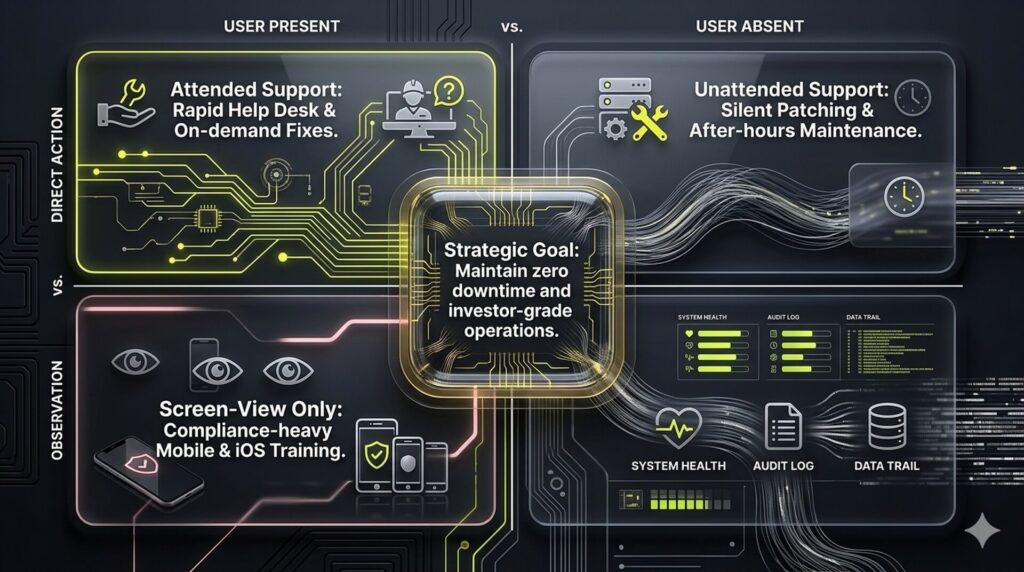
- Attended support uses one-time session codes for live help desk work, while unattended support uses persistent agents for after-hours patching and maintenance.
- Trust is won through transparent consent: identity verification, explicit access prompts, on-screen indicators, a visible kill button, and immutable session logs tied to the support ticket.
- Remote tools default to peer-to-peer paths and fall back to tunneled connections over port 443, so sessions usually work through firewalls without risky inbound port forwarding.
- For security and M&A readiness, require encryption in transit, MFA, role-based access control, and immutable logs rather than optimizing for connection speed alone.
1. Defining Remote IT Support: Rapid Triage and Resolution
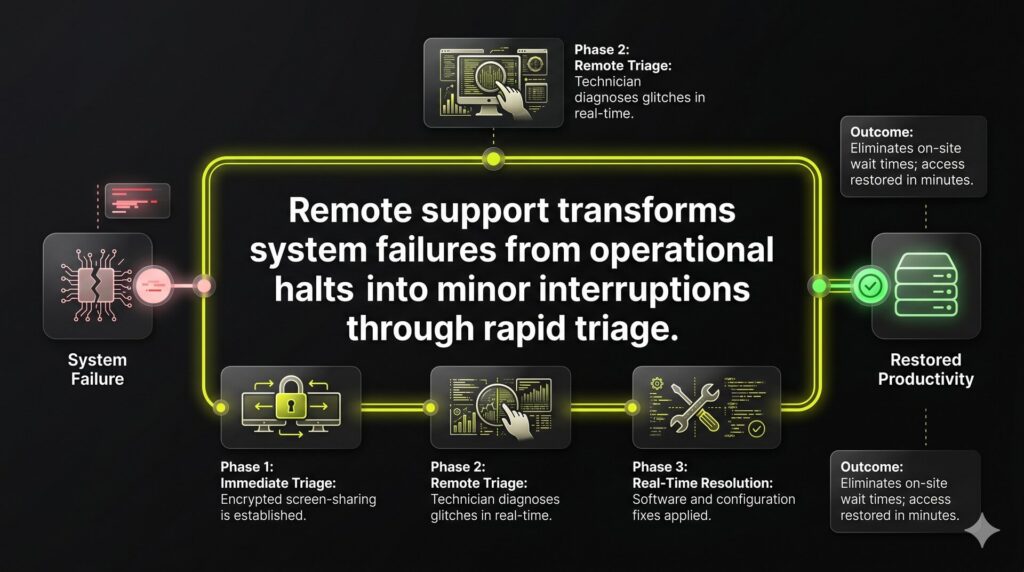
Remote IT support is an IT service that allows a technician to securely view and control a device from a separate location to resolve issues in real time. Through encrypted screen-sharing tools, experts troubleshoot software glitches and manage configurations as if they were physically present. This ensures immediate technical resolution and eliminates the wait for on-site visits.
For high-growth firms, this capability transforms system failures from operational halts into minor interruptions. The priority is rapid triage: restoring user access and stopping downtime so your team returns to billable work. Our infrastructure supports Windows, macOS, and mobile platforms for your entire distributed workforce. By removing physical truck rolls, you bypass geographical delays and reduce wait times from hours to minutes.
2. Operational Transparency: How Secure Remote Sessions Function
Client hesitation regarding remote IT support often stalls resolution. Overcoming this Technical Authority Gap requires a transparent, standardized workflow that keeps the end-user in total control. Secure tools establish an encrypted tunnel where the technician views the screen and manages mouse or keyboard inputs only after explicit authorization.
The operational flow follows a defined sequence:
- Identity verification and session code generation.
- User-authorized access to screen and hardware.
- Active troubleshooting via chat, file transfer, and remote commands.
- Formal session termination and access revocation.
Rigorous session logging ensures accountability. Every action is recorded and linked directly to the support ticket, creating a permanent audit trail for compliance and M&A readiness. This transparency reduces buyer hesitation and sets expectations that accelerate technical approval and time-to-resolution.
3. Mapping Remote Support Modes to Service Delivery
Inefficient support stalls C-suite productivity and erodes enterprise value. To maintain investor-grade operations, map remote support modes directly to business outcomes. This framework eliminates delivery friction and sets clear resolution expectations for every ticket.
Attended support drives rapid help desk response via session links for on-demand troubleshooting. Unattended support utilizes pre-installed agents for silent patching and maintenance after hours, ensuring zero downtime. For restricted platforms like iOS, screen-view-only modes guide users through configurations without compromising security or compliance.
- Break-fix: High-priority attended sessions for immediate recovery.
- Remote workforce: Managed endpoints via persistent agents.
- Maintenance: Automated after-hours unattended patching.
- Onboarding: Collaborative training via screen-sharing.
Defining these modes clarifies the prospect experience from the first call. Users understand when active collaboration is required and when infrastructure maintenance happens silently in the background to protect uptime.
4. Trust-Based Remote IT Support: Identity and Consent Protocols
User anxiety over remote access creates a Technical Authority Gap that stalls urgent resolutions. Differentiate your MSP by centering the human factor through standardized verification and consent protocols.
Start every session with a strict identity script. Technicians must verify ticket numbers, follow a callback policy, and use verified email domains. Before control is granted, users receive an explicit prompt. Maintain transparency with persistent on-screen indicators and a visible kill button for immediate session termination.
Scope clarity is vital. Technicians should narrate major actions and explicitly state they will not access personal files. Post-session hygiene ensures safety by removing temporary clients and resetting unattended credentials. These protocols reduce user resistance and accelerate time-to-resolution during high-urgency incidents.
5. Network Resilience: Overcoming Connectivity Barriers
Remote tools prioritize peer-to-peer paths for maximum speed but fall back to tunneled connections via port 443 when firewalls intervene. Since most environments permit outbound HTTPS traffic, remote IT support usually functions reliably without requiring risky inbound port forwarding. This logic ensures connectivity remains stable even within restrictive corporate perimeters.
When performance bottlenecks occur, our team executes a specific connectivity audit to restore session quality:
- VPN Toggles: Testing latency with and without active tunnels.
- Proxy Inspection: Identifying SSL stripping that interrupts data flows.
- Endpoint Security: Checking for antivirus or local firewall interference.
- Captive Portals: Verifying authentication on guest or public networks.
Relayed sessions serve as a critical safety net but may introduce latency compared to direct paths. We communicate these technical limits early during urgent tickets to align expectations and protect your team’s productivity. If primary remote access is entirely blocked, we provide a fallback workflow in minutes to prevent ticket stalls.
6. Performance Honesty: Navigating Latency and Low Bandwidth
Remote support is a battle against physics. When bandwidth drops, expect input delay and lower frame rates rather than fluid motion. Technical authority requires honesty about these constraints. While good enough performance might feel sluggish, it remains a viable path to resolution, avoiding the high cost and downtime of an on-site dispatch.
Why is remote IT support slow?
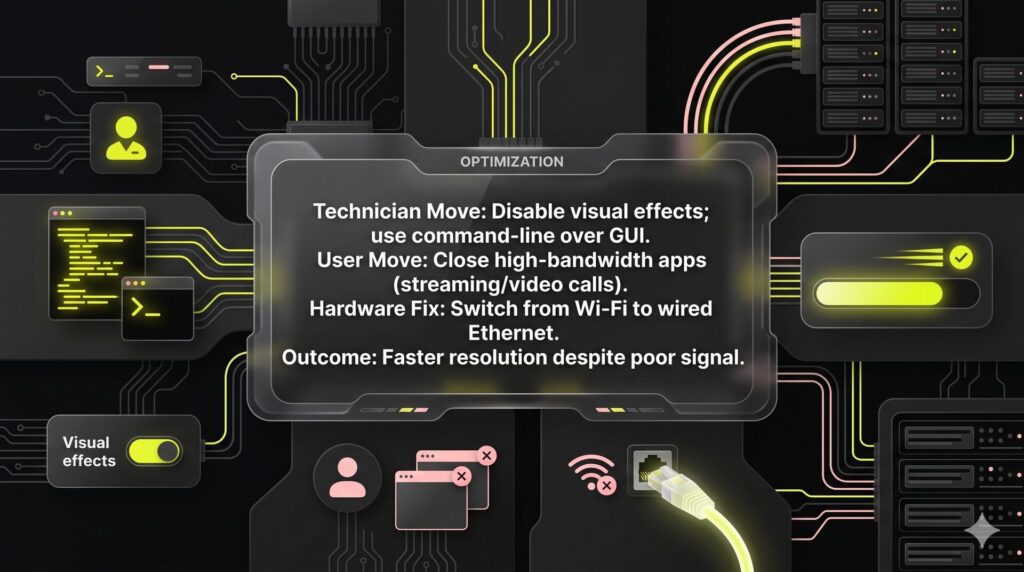
Latency usually results from network congestion or high round-trip times. To maintain stability, technicians use a low-bandwidth playbook:
- Reduce visual quality and refresh rates to save bandwidth.
- Disable background syncs and non-essential visual effects.
- Prioritize command-line tasks over GUI-heavy interactions for faster response.
Users can accelerate resolution by:
- Closing video calls and high-bandwidth streaming apps.
- Switching from Wi-Fi to a wired Ethernet connection.
- Moving closer to the router or trying an alternate network.
This transparency prevents trust-breaking lag from stalling progress. It ensures fewer escalations and faster resolutions for distributed teams, keeping your technical operations lean and predictable.
7. Governing the Stack: Security, Compliance, and Vendor Choice
Security vulnerabilities in remote IT support software frequently facilitate lateral movement during modern breaches. To build investor-ready enterprise value, prioritize auditability over mere connection speed. You must demand explicit controls to minimize the blast radius of any credential compromise:
- Encryption in transit and multi-factor authentication (MFA).
- Role-based access control (RBAC) and technician authentication.
- Immutable session logs and optional recording.
Compliance positioning for regulated clients requires strict log retention and documented SOPs without over-claiming regulatory status. Pricing models typically follow per-technician structures for high-volume help desks or per-endpoint pricing for scaling RMM environments.
Evaluate established legacy tools against MSP-native options by scrutinizing SSO integration, data residency, and support SLAs. To ensure your infrastructure is M&A-ready, we offer a Remote Support Stack & Risk Audit designed to align your technical tools with a high-growth RevOps mindset.
FAQ
Remote IT support is a professional service where technicians resolve technical issues by accessing a device through an encrypted network connection. It is used for both on-demand help desk assistance and the proactive management of endpoints across a distributed workforce. Because this model removes the need for physical travel, it provides the fastest possible path for rapid triage and minimizes downtime during critical system failures.
Yes, provided the service is supported by rigorous security protocols like multi-factor authentication (MFA) and role-based access control (RBAC). Safety depends on operational transparency. Every session should utilize end-to-end encryption and generate immutable logs of all technician actions. This audit trail is essential for maintaining compliance standards and building the technical authority required for M&A readiness and investor-grade security.
Attended support involves a technician and a user working together in real time, usually initiated by a one-time session code. Unattended support uses a persistent agent to allow technicians to access systems for after-hours maintenance or silent patching without user intervention. While unattended access improves operational efficiency, it requires stricter governance and access revocation policies to ensure that the background connection does not become a security vulnerability.
Most connection failures stem from network security layers like firewalls, proxies, or VPNs that interpret the support traffic as a threat. If a session fails to launch, first confirm your internet connection is active and stable. Next, try toggling your VPN off or checking if a local antivirus is blocking the application. Most remote tools utilize outbound port 443, which is standard for web traffic and typically bypasses restrictive perimeters.
Most software-based incidents and configuration errors are resolved in minutes, making remote access the most efficient delivery model for modern MSPs. It eliminates the delay of physical logistics and traditional on-site visits. However, issues involving hardware failure, a complete lack of internet connectivity, or specific regulatory constraints may still require on-site escalation to ensure a complete and compliant resolution, an approach aligned with how NUOPTIMA focuses on driving measurable, revenue-based outcomes.
Where this fits in your MSP growth system
This is one piece of how NUOPTIMA makes MSPs and cybersecurity firms the provider buyers find on Google and in AI search. See how it connects to cybersecurity SEO and MSP SEO, or get your free MSP lead forecast to see exactly where your firm shows up across ChatGPT, Gemini, and Perplexity today.