Most MSP sites prioritize desktop views while high-intent leads search for emergency support via mobile. This script-heavy desktop bias erodes enterprise valuation.
Effective mobile SEO MSP strategy serves as a valuation-grade growth asset that builds organic equity with investor-grade discipline. We provide a prioritized checklist to improve rankings and conversions by optimizing for mobile-first indexing and Core Web Vitals. We start with measurement and triage to map fixes to ranking signals instead of design opinions.
Key Takeaways
- MSPs should triage only pipeline-critical URLs (homepage, core service pages, and Google Business Profile landing pages) for Core Web Vitals rather than spreading speed work across the whole site.
- Because Google uses mobile-first indexing, any content hidden in mobile accordions or simplified layouts is effectively invisible to crawlers, so the mobile DOM must include full service descriptions, locations, FAQs, and trust proof.
- For MSP sites, persistent chat widgets and RMM tracking scripts often hurt LCP and INP more than unoptimized images, so measure script impact before stripping image assets.
- Mobile conversion paths need a tappable click-to-call button above the fold, short four-field forms, and early trust proof like a 15-minute response promise to capture urgent, high-intent support queries.
Mobile SEO for MSPs is the practice of optimizing a managed service provider's site for mobile-first indexing, Core Web Vitals, and mobile conversion so high-intent buyers searching on phones can find and contact the firm.
1. Triage Pipeline-Critical Pages via Core Web Vitals
Most MSPs waste resources on site-wide optimizations that fail to impact lead flow. Ruthlessly triage only the URLs that generate pipeline: the homepage, core service pages, and Google Business Profile landing pages. This fixes the primary mobile SEO drag of slow or unstable pages and replaces random speed work with focused revenue protection.
Audit these priority URLs for mobile performance using the GSC Core Web Vitals report and PageSpeed Insights. Target Good thresholds at the 75th percentile for these metrics:
- Largest Contentful Paint (LCP)
- Interaction to Next Paint (INP)
- Cumulative Layout Shift (CLS)
Identify the LCP element and top two opportunities per page. One MSP-specific gotcha: persistent chat widgets and RMM tracking scripts often skew performance more than unoptimized images. Record script impact before stripping assets to ensure technical efforts map directly to ranking signals and pipeline rather than generic site-wide guesses.
2. Eliminate Content Parity Gaps to Secure Ranking Parity
Mobile-first indexing means Google crawls, indexes, and ranks the mobile version of your site as the primary version, not the desktop one. Whatever your phone visitors see is what Google reads to decide where you rank, on every device. For an MSP, that turns mobile parity from a design preference into a ranking prerequisite: if your credentials, service depth, and location proof only exist in the desktop layout, they do not count.
Many MSPs unintentionally hide high-intent assets like vertical expertise or trust proof behind accordions or simplified mobile layouts. Because Google uses mobile-first indexing, content omitted from the mobile render is effectively invisible to crawlers. This parity gap directly compromises your mobile SEO MSP performance and erodes the technical authority needed to convert C-suite decision-makers.
Ensure the mobile DOM includes full service descriptions, locations, vertical expertise, FAQs, and trust proof across all money intent pages. Navigation and footer internal links must remain identical to preserve service-to-industry pathways. Validate that LocalBusiness, Service, and contactPoint JSON-LD remain consistent across responsive designs or separate mobile templates. Use the URL Inspection tool in Google Search Console to audit the rendered HTML and confirm Google indexes your complete expertise. The same parity discipline feeds your AI citation strategy, since ChatGPT and Perplexity read the rendered page to decide whether to recommend your firm.
3. Diagnose and Fix LCP and INP Performance Bottlenecks
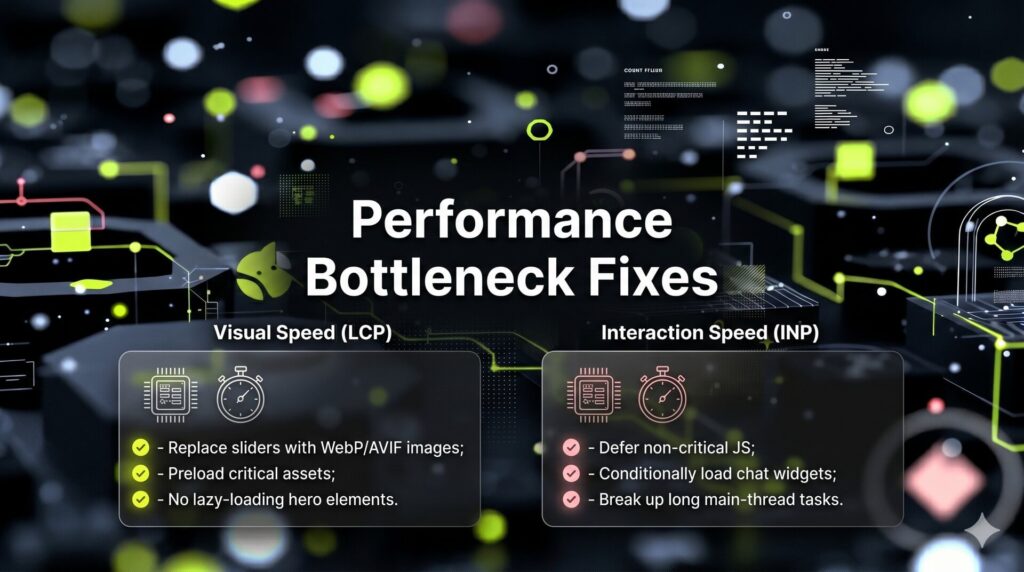
MSP performance failures usually concentrate in oversized hero media and excessive JavaScript execution. Fixing Largest Contentful Paint (LCP) and Interaction to Next Paint (INP) yields outsized gains without a full redesign. If your LCP element is a slider or video, replace it with compressed WebP or AVIF images using responsive `srcset` attributes. Avoid autoplaying mobile video, never lazy-load the LCP element, and preload only when justified by data.
For INP, audit main-thread tasks from chat widgets and tag managers. Implement these high-leverage fixes:
- Defer non-critical JavaScript and reduce tag manager bloat.
- Load schedulers and chat widgets conditionally on contact pages.
- Break up long tasks and use lightweight embeds.
Protect conversion-critical tracking by moving to server-side or edge options rather than removing vendors. Finally, re-test in PageSpeed Insights and monitor the 28-day field data window. These targeted improvements resolve real-world bottlenecks to strengthen your mobile SEO MSP authority.
4. Align Mobile Conversion Paths with High-Intent Buyer Behavior
High mobile bounce rates occur when a mobile SEO MSP strategy drives traffic to desktop brochures that ignore mobile intent. Urgent support queries require immediate reassurance and frictionless contact. Surface a tappable Click-to-Call button above the fold alongside a secondary Schedule Meeting CTA.
Reduce friction by prioritizing these mobile-first elements:
- Short Forms: Limit to four fields (name, company, contact, and what's going on?) to save deep qualification for later.
- Early Trust Proof: Display 15-minute response promises, certifications, and vertical badges immediately.
- UX Stability: Use sticky headers for CTA persistence and provide immediate form feedback without full-page reloads.
Track call clicks and form submissions separately by device. Compare conversion rates across service, location, and contact pages to ensure mobile traffic builds organic equity and investor-grade revenue data.
5. Engineer Mobile Trust Hubs to Capture Local Intent
Ranking for global technical terms is useless if you disappear for local queries like IT support near me. This Technical Authority Gap occurs when your website architecture lacks symmetry with your Google Business Profile (GBP) signals. Address this by engineering a mobile trust hub landing page optimized for local pack dominance, following the same fundamentals covered in our local SEO for MSPs guide.
Align your H1 and Title tags with your city and GBP category. Ensure perfect NAP consistency and clarify your service area. Integrate these mobile-first essentials:
- Prominent click-to-call buttons and emergency support notes.
- An interactive map embed for immediate directions.
- LocalBusiness and Service schema with a specific contactPoint for phone access.
Keep content skimmable within two screens to demonstrate response speed. Link to core service and vertical pages to strengthen internal authority flow. Feature local testimonials or associations to reduce friction. If you are rebuilding rather than patching, run the structure against our MSP website design checklist so the mobile foundation is right before you chase Core Web Vitals. This mobile SEO MSP strategy captures high-intent demand while building valuation-grade organic equity.

6. Optimize Asset Delivery to Eliminate Mobile Performance Drag
Mobile users pay for every unoptimized vendor badge and legacy PDF your site forces them to download. This bandwidth tax triggers immediate bounces and signals to Google that your technical authority is a facade. To secure mobile SEO MSP rankings, treat asset delivery as a valuation-grade performance priority.
Audit imagery by transitioning to modern WebP or AVIF formats and resizing assets to actual display dimensions. Lazy-load non-critical elements and replace heavy PNG vendor badges with optimized SVGs. Finally, minimize font weight variants and preload critical typefaces to prevent layout shifts.
Stop using PDFs as primary mobile content. Link large datasheets as secondary downloads with file size labels or create HTML summaries that rank and convert better. Ensure robots.txt allows full rendering of CSS and JS. Resolve Search Console usability errors and eliminate redirect chains to maintain a high-equity technical footprint.
How to Execute a 30-Day Mobile SEO MSP Sprint
Core Web Vitals, mobile-first indexing, and mCRO fail when managed as disconnected tasks. This 30-day mobile SEO MSP sprint aligns technical performance with pipeline outcomes using RevOps-grade discipline.
Execution Prerequisites
Gather these assets before starting:
1. Identify the top 10 pages by organic clicks and the top 10 by lead conversions.
2. Audit GSC, GA4, and Google Tag Manager to inventory all active scripts.
4-Step Implementation Workflow
Week 1: Measurement and Triage
Run GSC Core Web Vitals and PageSpeed Insights on priority URLs. Document the LCP element, top INP offenders, and CLS sources. You will establish a performance baseline that maps technical fixes directly to ranking signals.
Week 2: Indexing Parity
Verify that the mobile render contains full content, internal links, and schema on all money pages. Use the GSC URL Inspection tool to identify and fix any mobile hidden content. This ensures your complete expertise remains visible to Google’s mobile-first crawler.
Week 3: Performance Fixes
Optimize hero media and implement script deferral for heavy assets like chat widgets. Execute font cleanup and set explicit dimensions for all media to eliminate layout shifts. You will see improved load times and higher page stability.
Week 4: Conversion Pass
Place click-to-call buttons and social proof above the fold. Shorten lead forms to four fields and verify mobile tracking for all form submissions in GA4.
Business Outcomes
Track CWV trends and device-level conversion rates to prove impact. Faster pages reduce bounce rates and increase qualified meetings. Book an M&A Readiness Web Performance Review today to ensure your site supports investor-grade growth.
For more insights on structuring high-impact SEO strategies, you can explore NUOPTIMA.