BCDR for an MSP means two jobs in one platform: backing up client data, and recovering it fast enough that the business keeps running when ransomware hits or a server dies. Backup alone is not continuity. If you can restore a file in three days but the client is down the whole time, you failed the test that matters. For most MSPs, Datto BCDR (SIRIS) is still the premium category leader on reliability and instant virtualization, but there is real and growing demand for lower-cost alternatives, and the strongest cases for Cove, Axcient, NAKIVO, or a Synology capex approach are more common than the market admits. Separately, SaaS and Microsoft 365 backup is a different purchase most MSPs overlook, and Microsoft's own shared-responsibility model puts that client data on you, not on Microsoft. This guide compares 10 tools grouped by type: full BCDR (appliance plus cloud), cloud and software backup, capex and appliance, and SaaS backup for Microsoft 365 and Google Workspace.
We don't sell, resell, or take commissions on any tool in this guide, and no vendor paid to be here. Our business is helping MSPs get found by buyers, which only works if lists like this are actually right.
Key Takeaways
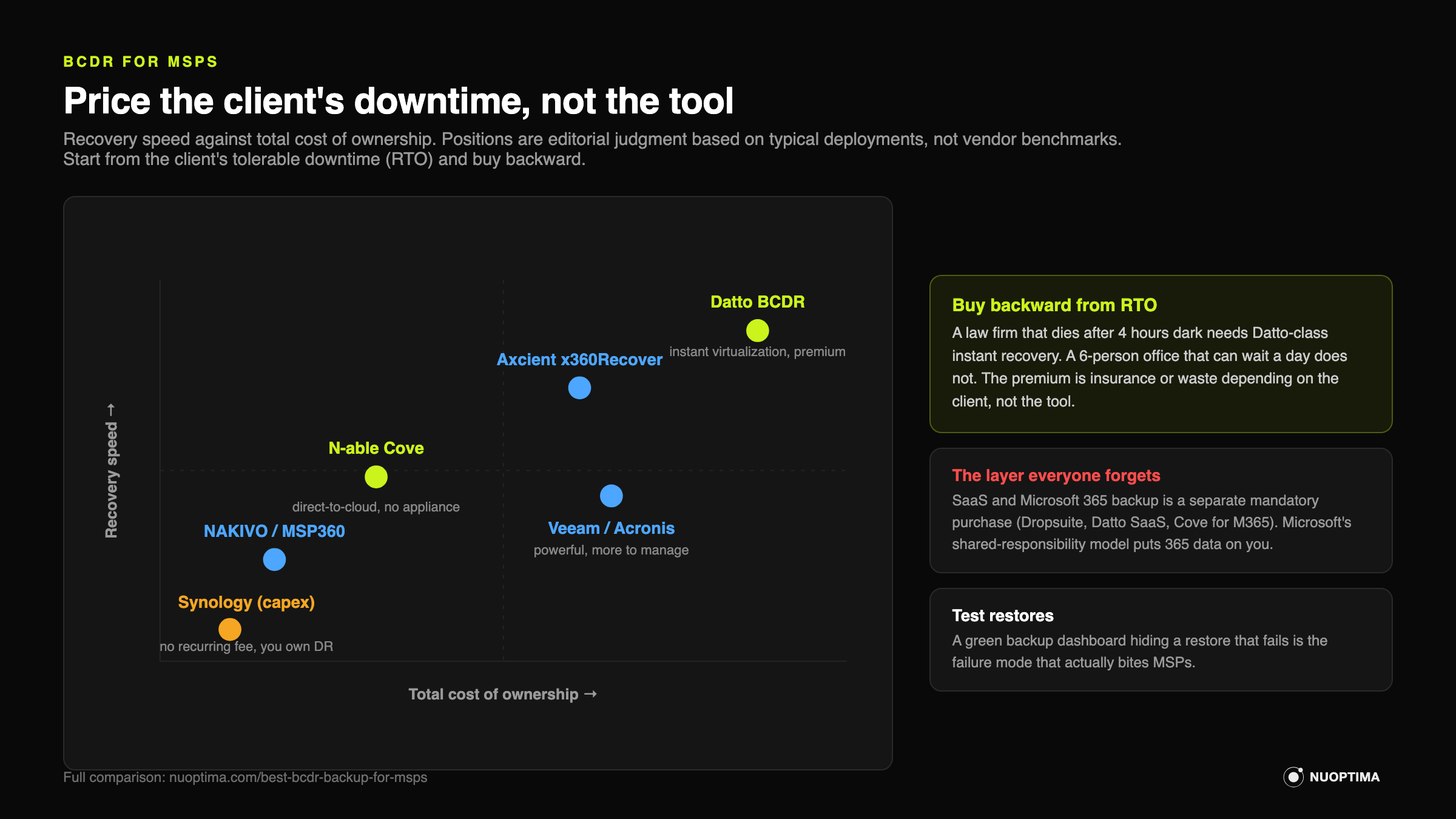
- Price the client's downtime, not the tool. Start from each client's tolerable downtime (RTO) and buy backward. The premium tier is insurance for one client and waste for another.
- Datto BCDR (SIRIS) is the premium leader. Best reliability, instant local and cloud virtualization, strong channel support. You pay for it, and you pay Kaseya for the ecosystem.
- Best value alternatives are real, not compromises. Axcient x360Recover and N-able Cove win on MSP economics; NAKIVO and MSP360 win on flexibility and cost.
- The gap most MSPs miss: SaaS and Microsoft 365 backup. Microsoft's native 365 Backup is a paid add-on, not a default, and the shared-responsibility model still puts client data protection on you. Third-party SaaS backup remains a separate, mandatory layer.
- Cost model decides more than features. Appliance plus cloud is opex-heavy and premium. Direct-to-cloud removes the appliance. Synology-based is capex with no per-workload fee at typical scale (license packs apply to larger clusters), but the responsibility shifts to you.
- The 3-2-1 rule still holds. Three copies of data, on two media types, one off-site. Apply it per client.
- Test restores, not just backups. The failure that actually bites MSPs is a green backup dashboard hiding a restore that does not work.
MSP backup solutions compared
| Tool | Type | Best for | Pricing model | Watch-out |
|---|---|---|---|---|
| Datto BCDR (SIRIS) | Full BCDR (appliance + cloud) | MSPs wanting the most proven continuity | Appliance + cloud, opex, quote-based | Premium price, Kaseya-owned ecosystem |
| ConnectWise BCDR | Full BCDR (appliance + cloud) | ConnectWise-stack MSPs | Appliance + cloud, opex | Less standout as a standalone |
| Axcient x360Recover | Full BCDR (appliance + cloud) | Datto alternative on better economics | Per-endpoint/workload, direct-to-cloud or appliance | Smaller brand recognition |
| Veeam | Cloud & software backup | Enterprise-grade flexibility | Per-workload licensing, VCSP | Licensing complexity, more self-managed |
| Acronis Cyber Protect Cloud | Cloud & software backup | Backup plus security in one agent | Per-workload/per-GB, opex | Can feel heavy and broad |
| N-able Cove | Cloud & software backup | Value, direct-to-cloud, no appliance | Per-device, cloud storage included | Large local restores are slower |
| NAKIVO | Cloud & software backup | VMware/Hyper-V/Synology on a budget | Per-workload or subscription, MSP tiers | More hands-on, less brand pull |
| MSP360 | Cloud & software backup | Storage-agnostic, bring-your-own-cloud | Per-workload + your own S3/Wasabi/B2 | DIY, thinner hand-holding |
| Synology Active Protect | Capex / appliance | Margin via no recurring fee | Capex, buy the appliance | You own the hardware and the responsibility |
| Dropsuite / Datto SaaS / Cove for M365 | SaaS / M365 backup | The mandatory separate 365 layer | Per-seat/per-mailbox, opex | Skipping it leaves client 365 data unprotected |
Full BCDR: Appliance Plus Cloud
This is the category most people mean when they say "BCDR." A local appliance takes image-based backups and can spin up a failed server as a virtual machine on-site in minutes, with a cloud copy for off-site recovery. It is the most turnkey continuity, and the most expensive.
 Datto BCDR (SIRIS)
Datto is the category leader, and for good reason: instant local and cloud virtualization, screenshot backup verification, and a reliability record most MSPs trust with their largest clients. If a client server dies, you boot it as a VM on the appliance while you sort the hardware.
Strengths: Proven reliability, fast local and cloud failover, strong channel support and community, mature tooling. When continuity genuinely cannot fail, Datto is the safe answer.
Where it falls short: You pay a premium, and Kaseya ownership means you are buying into an ecosystem and its pricing posture. Some MSPs report the total cost is hard to justify on thin-margin or price-sensitive accounts, which is exactly why the alternatives below exist.
Best for: MSPs whose clients need the most bulletproof continuity and who can price the premium into the contract.
 ConnectWise BCDR
ConnectWise BCDR is backup and continuity sold inside the ConnectWise stack, and its current lineup is built on Axcient x360Recover technology. Evaluate it as the integrated route to the same engine rather than an independent alternative: if you already run ConnectWise PSA and RMM, the integration and single-vendor billing are the draw.
Strengths: Convenient if you are already ConnectWise, tight integration with the tools your techs already use, one throat to choke on support.
Where it falls short: As a standalone BCDR platform it is less of a standout than Datto or Axcient. The reason to pick it is usually stack alignment, not because it wins the head-to-head on the appliance itself.
Best for: MSPs standardized on ConnectWise who value one integrated stack over best-of-breed BCDR.
 Axcient x360Recover
Axcient is the alternative most MSPs actually shortlist against Datto. Chain-free backups avoid the corruption and consolidation headaches of traditional incremental chains, and you can run direct-to-cloud or with a local appliance depending on the client.
Strengths: Strong MSP economics, chain-free reliability, flexible deployment (appliance or direct-to-cloud), and AutoVerify for restore confidence. Genuinely capable, not a budget compromise.
Where it falls short: Smaller brand than Datto, so it carries less weight if a client's insurer or auditor is checking box-names. Fewer third-party integrations in some stacks.
Best for: MSPs who want Datto-class continuity with better per-workload economics, especially across a book of mid-market clients.
Cloud and Software Backup
These tools skip or de-emphasize the local appliance. You back up direct to cloud or to storage you choose. The trade is lower fixed cost against slower large local restores. This is where margin-conscious MSPs spend most of their evaluation time.
 Veeam
Veeam
Veeam is the enterprise-grade standard for backup and replication, and its Service Provider Console lets MSPs manage client estates at scale. If you have complex virtual environments, Veeam handles them.
Strengths: Powerful, flexible, broad platform support, and the depth to cover demanding VMware and Hyper-V estates. The Veeam Cloud Service Provider program gives MSPs a real multi-tenant path.
Where it falls short: Licensing can get complex, and there is more for your team to design, host, and manage yourself. It rewards MSPs with the engineering maturity to run it well and punishes those looking for turnkey.
Best for: MSPs with larger or more complex client environments and the in-house skill to run a flexible platform.
 Acronis Cyber Protect Cloud
Acronis folds backup and security into a single agent: backup, anti-malware, and endpoint protection from one console. For MSPs trying to consolidate vendors, that is the pitch.
Strengths: Backup plus integrated security in one place, broad workload coverage, and per-workload or per-GB billing that flexes with client size. Good fit if you want protection and backup under one roof.
Where it falls short: The all-in-one breadth can feel heavy, and MSPs who only want clean backup sometimes find it does more than they need. Watch the storage and add-on costs as usage grows.
Best for: MSPs who want to consolidate backup and endpoint security into one agent and one bill.
 N-able Cove Data Protection
Cove is cloud-first by design: direct-to-cloud backup with no local appliance required, and storage efficiency that keeps costs predictable. It removes the appliance line item entirely, which changes the margin math.
Strengths: Strong value, no appliance to buy or maintain, cloud storage included, and efficient incremental backups that keep bandwidth and storage in check. Easy to standardize across a fleet of small and mid-size clients.
Where it falls short: Direct-to-cloud means very large local restores take longer than booting a VM off a Datto or Axcient appliance on-site. If a client needs instant full-server failover, Cove is the wrong tool for that account.
Best for: MSPs with price-sensitive clients and modest local-restore needs who want to kill the appliance cost.
 NAKIVO Backup and Replication
NAKIVO is the cost-effective workhorse for VMware, Hyper-V, and Synology-friendly environments, with MSP pricing that flexes. Practitioners consistently favor it when the budget is tight and the environment is virtualization-heavy.
Strengths: Low cost, flexible per-workload or subscription pricing, solid VMware and Hyper-V support, and it runs happily on a Synology NAS as the backup target, which pairs well with a capex approach.
Where it falls short: Less brand recognition, so it carries less weight in front of cautious buyers, and it is more hands-on to deploy and tune than a turnkey appliance.
Best for: MSPs running virtualized client estates who want strong function per dollar and do not need a big-name label.
 MSP360 (formerly CloudBerry)
MSP360 is storage-agnostic: you bring your own cloud (Amazon S3, Wasabi, Backblaze B2) and pay for the software plus whatever storage you choose. That decoupling is the whole point, and it can cut cost dramatically.
Strengths: Very cost-effective, flexible, and storage-agnostic, so you control where data lands and what you pay for it. Good for MSPs who want to arbitrage cheap object storage and keep full control.
Where it falls short: More DIY. You assemble and manage the storage relationship, and the hand-holding is thinner than a full-service BCDR vendor. Continuity features are lighter than appliance-based platforms.
Best for: Technically confident MSPs who want maximum cost control and are comfortable owning the storage layer.
Capex and Appliance
 Synology Active Protect
Synology Active Protect is appliance-based backup you buy once, with no per-workload fee at typical deployment sizes (term license packs apply to larger multi-server clusters). That capex model is a practitioner favorite for margin: the client (or you) buys the box, and there is no monthly per-server bill eating the spread.
Strengths: No recurring per-workload cost, predictable capex, and a hardware platform many MSPs already know and trust as a NAS. Good margin structure for capex-friendly clients who would rather buy than rent.
Where it falls short: You own the hardware and the responsibility. There is no vendor cloud instantly virtualizing a dead server for you, so continuity is less turnkey than Datto. If the box fails or the site floods, your off-site strategy is on you to design and maintain.
Best for: Margin-focused MSPs with capex-friendly clients and the discipline to build and test their own off-site and restore process.
SaaS and Microsoft 365 Backup (A Separate Need)
This is the layer most MSPs forget, and it is not optional. Microsoft 365 and Google Workspace operate on a shared-responsibility model: the provider keeps the service running, but protecting the data inside it is the customer's job, which in practice means yours. Retention policies, litigation holds, and the recycle bin are not backup. A ransomware event, a rogue admin, or a malicious insider can destroy 365 data that Microsoft will not restore for you.
Treat this as a mandatory separate purchase alongside your endpoint and server BCDR. The main options MSPs run are Dropsuite, Datto SaaS Protection, and N-able Cove for Microsoft 365, all billed per seat or per mailbox on an opex basis. Each backs up Exchange, SharePoint, OneDrive, and Teams. Dropsuite and Datto SaaS Protection also cover Google Workspace; Cove is Microsoft 365 focused. Microsoft now sells its own Microsoft 365 Backup add-on (Exchange, OneDrive, SharePoint), which belongs in the evaluation but is not a reason to skip this layer. Pick one, standardize it across every 365 client, and bill it as a line item. On the BCDR side more broadly, Slide is an emerging challenger worth watching as newer entrants push on Datto's pricing.
Best for: Every MSP with even one Microsoft 365 or Google Workspace client, which is to say every MSP.
How to Choose BCDR for Your MSP
Work the decision in this order. Feature lists come last.
Related guides
This guide is part of the Ultimate Guide to the MSP Tech Stack. Continue with the other layers of the stack:
- Best RMM Software for MSPs
- Best PSA Software for MSPs
- Best Microsoft 365 Management Tools for MSPs
- Best AI and Automation Tools for MSPs
About NUOPTIMA
NUOPTIMA is an AI-native growth agency built for MSPs, combining traditional SEO with GEO (generative engine optimization) so you show up both in Google and in the AI tools buyers now use to shortlist providers. We do not sell BCDR software. We help the MSPs who deploy it get found by the clients who need it.
Cortavo, a $7M MSP, went from 261 to 10,000 organic visitors a month in 9 months. If you want to see where your own MSP shows up (and where you are invisible) when a prospect asks Google or ChatGPT for a provider, we can run a quick visibility teardown of your site and your AI-search presence. No pitch, just a clear read on the gaps.