The MSP tech stack is the connected set of platforms a managed service provider runs its business on: the RMM that watches and fixes client devices, the PSA that turns that work into tickets and invoices, the tools that manage client Microsoft 365 tenants, the backup and continuity layer that saves you when ransomware hits, and the automation and AI layer that ties it all together. Get the stack right and a small team supports thousands of endpoints profitably. Get it wrong and you pay for overlapping tools, drown in manual work, and watch margin leak. This guide maps the five layers, names the leading tools in each, and shows how to assemble them in the right order for your size, with a deeper comparison guide behind every layer.
Most stack advice is really just a list of tools. The harder question, the one that decides your margin, is how the layers fit together and which ones to buy first. That is what this guide is built around.
We don't sell, resell, or take commissions on any tool in this guide, and no vendor paid to be here. Our business is helping MSPs get found by buyers, which only works if lists like this are actually right.
Key Takeaways
- The stack is five layers: RMM, PSA, Microsoft 365 management, BCDR and backup, and AI and automation. Every MSP runs some version of all five.
- Get the RMM and PSA core right first. These two are your operational spine, and the integration between them matters more than any single feature.
- Security and backup are non-negotiable, not upgrades. Backup in particular is your responsibility, not Microsoft's, and it is the layer MSPs most often under-build.
- Add AI and automation last. Automate a process you already run well. Automating a broken one just breaks it faster.
- The 60% overlap tax. Three tools that each do 60% of the same job cost more than any single overpriced platform. Sprawl, not sticker price, is the quiet margin killer.
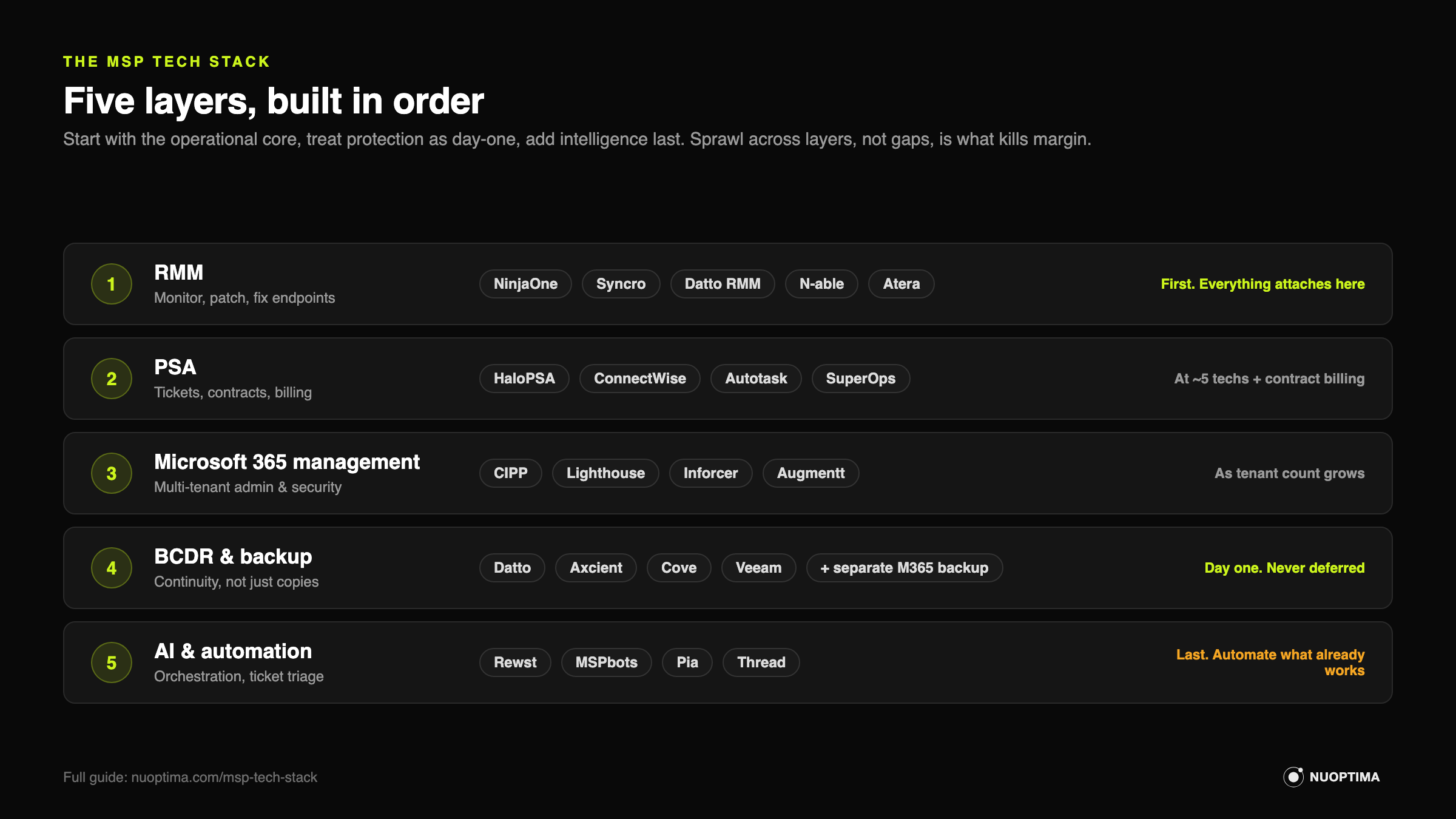
The five layers of the MSP tech stack
| Layer | What it does | Deep-dive guide | Leading picks |
|---|---|---|---|
| RMM | Monitor, patch, and fix client endpoints at scale | Best RMM Software for MSPs | NinjaOne, Syncro, Datto RMM |
| PSA | Tickets, time, contracts, and billing | Best PSA Software for MSPs | HaloPSA, ConnectWise PSA, SuperOps |
| Microsoft 365 management | Admin, security, and provisioning across client tenants | Best Microsoft 365 Management Tools | CIPP, Microsoft 365 Lighthouse, Inforcer |
| BCDR and backup | Back up client data and recover fast after failure | Best BCDR and Backup Tools | Datto, Axcient, N-able Cove |
| AI and automation | Orchestrate the stack and add AI to the service desk | Best AI and Automation Tools | Rewst, MSPbots, Pia |
Layer 1: RMM, the operational core
RMM (remote monitoring and management) is the layer everything else attaches to, so it is the first decision to get right. It is the software that lets a few technicians watch, patch, and fix thousands of client devices from one console. The market has largely settled on NinjaOne for technician experience, with Syncro and Atera winning on flat per-technician pricing for smaller shops, and Datto RMM, ConnectWise RMM, and N-able N-central serving the traditional and enterprise end.
The decision that quietly sets your bill for years is not the feature list, it is the pricing model: flat per-technician versus per-endpoint, and which is cheaper flips entirely on how many endpoints each of your techs supports. There are also free entry points (Action1, free for the first 200 endpoints; Tactical RMM, source-available and self-hosted) that vendor-sponsored lists tend to bury.
For the full comparison of 10 platforms, the pricing math, and the free tiers, read Best RMM Software for MSPs.
Layer 2: PSA, where the work becomes money
PSA (professional services automation) is the layer that turns technician effort into tickets, time entries, contracts, and invoices, which makes it the difference between being busy and being paid. HaloPSA is the modern practitioner favorite, ConnectWise PSA is the deep incumbent, and SuperOps, Syncro, and Atera pair PSA with RMM for smaller teams.
The counterintuitive point most guides miss: a small MSP usually should not buy a standalone PSA yet. Under roughly five technicians, the ticketing built into your RMM is enough, and adding a full PSA too early buys complexity you are not ready to run. The other trap is migration cost, because moving PSAs later is a multi-month project, so the switching cost matters as much as the license price.
When to buy, what to buy, and how to avoid the migration trap are covered in Best PSA Software for MSPs.
Layer 3: Microsoft 365 management, the multi-tenant problem
Microsoft 365 management is the layer that keeps you sane once you are administering security, provisioning, and policy across dozens of client tenants. The honest answer here surprises people: there is no single tool. You assemble a small set across four jobs, admin and provisioning (CIPP or Microsoft 365 Lighthouse), security posture and baselines (Inforcer, Augmentt), backup, and automation.
Backup earns its own emphasis because of a fact many MSPs learn the hard way: Microsoft does not back up client 365 data by default. Its own Microsoft 365 Backup is a paid add-on, and the shared-responsibility model puts data protection squarely on you, which is why a deliberate 365 backup purchase is mandatory, not optional.
The four jobs, the CIPP free-versus-paid trade-off, and how the pieces fit are in Best Microsoft 365 Management Tools for MSPs.
Layer 4: BCDR and backup, the layer you cannot fake
BCDR (business continuity and disaster recovery) is the layer that decides whether a client survives ransomware or a dead server, so it is the one you never cut to save a few dollars. Backup alone is not continuity. If you can restore a file in three days while the client sits dark the whole time, you failed the test that matters. Datto is the premium leader, but Axcient, N-able Cove, NAKIVO, and a Synology capex approach win in specific and common situations.
Two things separate MSPs that sleep well from the ones that get the 2am call: they add a separate SaaS and Microsoft 365 backup layer, and they test restores instead of trusting a green dashboard.
When each Datto alternative makes more financial sense, and how to build a stack around the 3-2-1 rule, is covered in Best BCDR and Backup Tools for MSPs.
Layer 5: AI and automation, the multiplier you add last
AI and automation is the layer that multiplies a stack that already works, which is exactly why it comes last. Rewst leads orchestration, MSPbots adds automation and business intelligence, and a fast-moving field of AI service-desk tools (Pia, Thread, and the AI features now built into ConnectWise, Atera, and SuperOps) is competing for ticket triage and resolution.
Two cautions carry real money. First, the AI service-desk space is a seed-stage vendor swarm that analysts expect to consolidate, so bet on category leaders or keep your switching costs low and your data portable. Second, keep client data off public LLMs, and favor tools with private or closed models for anything that touches it.
The function-by-function breakdown, and how to pilot AI without getting burned, is in Best AI and Automation Tools for MSPs.
Where security and documentation fit
Security is deliberately not drawn as a sixth box, because in a well-built MSP software stack it runs through every layer: endpoint protection and patching live in your RMM, identity and posture management live in the Microsoft 365 layer, and ransomware recovery is the whole point of BCDR. Dedicated security tooling (EDR, MDR, a SOC partner) sits on top of those layers and deserves its own guide; treating it as one more line item in a tool list undersells the biggest risk decision an MSP makes.
Documentation is the quiet layer most stack guides skip. IT Glue (Kaseya-owned, the market leader) and Hudu (the rising value alternative) hold the credentials, configurations, and SOPs that make every other layer usable when the tech who set it up is on holiday. It is rarely the first purchase, but mature MSPs treat it as core infrastructure, not a nice-to-have.
How to build your MSP tech stack by stage
Start with the core, make security and backup non-negotiable, and add automation only once the basics run cleanly.
| MSP stage | Priorities in order |
|---|---|
| Solo or 2 to 5 techs | All-in-one RMM plus built-in ticketing (Syncro, Atera), third-party 365 backup, a simple BCDR. Skip the standalone PSA. |
| 5 to 20 techs | Dedicated RMM (NinjaOne) plus a real PSA (HaloPSA), M365 security baselines, tested BCDR, first automation workflows. |
| 20-plus techs | Deep RMM (N-central) or an integrated ecosystem, mature PSA, full M365 management stack, enterprise BCDR, orchestration (Rewst) across the board. |
| Any stage | Backup and security are never the layer you defer. Build them in from day one. |
The mistake that quietly costs MSPs the most
The most expensive stack problem is rarely one overpriced tool. It is sprawl: three tools that each do 60% of the same job, none integrated, all billed monthly. It shows up as a documentation tool that overlaps your PSA, an RMM add-on that duplicates a standalone security product, and two backup vendors nobody remembers signing. Audit the stack once a year, map every tool to a layer above, and cut the overlap. Consolidation onto fewer, better-integrated platforms usually buys back both margin and time.
The second quiet mistake sits outside the stack entirely. The tools above run your service delivery, but none of them decide whether a buyer ever finds you. That is a different problem, and increasingly it is where growth is won or lost.
MSP tech stack checklist
Run this once a year against your own stack:
- One RMM, priced against your endpoint-to-technician ratio, not the demo.
- Ticketing that matches your size: RMM built-in under ~5 techs, a dedicated PSA beyond that.
- A multi-tenant M365 admin layer (CIPP or Lighthouse) plus enforced security baselines.
- BCDR matched to each client's tolerable downtime, with restores actually tested.
- Separate Microsoft 365 backup on every tenant. No exceptions.
- Documentation (IT Glue, Hudu) current enough that a new tech can work from it.
- Automation only on processes that already run well manually.
- Zero tools whose job another tool on this list already does.
About NUOPTIMA
NUOPTIMA is an AI-native growth agency built for MSPs, MSSPs, and cybersecurity firms. We combine traditional SEO with GEO, the work of getting your business cited by ChatGPT, Gemini, Claude, and Perplexity when a buyer asks them for a recommendation. Your tech stack runs your service delivery. A separate kind of visibility decides whether buyers find you at all, and most MSPs are invisible where that research now starts.
Cortavo, a $7M MSP, went from 261 to 10,000 organic visitors a month in 9 months. If you want to see where you stand today, we run a short visibility teardown that shows how you rank in search and whether the AI engines mention you at all. No pitch, just the gaps and what to fix first.