If you manage dozens or hundreds of client Microsoft 365 tenants, "M365 management" means running security, provisioning, and backup across all of them from one place instead of logging into each tenant by hand. Here is the honest answer most listicles avoid: there is no single tool that does the whole job. You assemble a small stack. For the multi-tenant admin layer, CIPP is the open-source option practitioners consistently favor, and Microsoft 365 Lighthouse is the free native baseline that ships with the partner tier. Everything else layers on top of those two.
This guide compares 8 tools grouped by the job each one does: multi-tenant admin and provisioning, security posture and baselines, backup, and automation. We cover where each tool is strong, where it falls short, and how the pricing model works, so you can build a stack that fits how you actually run tenants rather than buying one console and hoping it covers everything.
We don't sell, resell, or take commissions on any tool in this guide, and no vendor paid to be here. Our business is helping MSPs get found by buyers, which only works if lists like this are actually right.
Key Takeaways
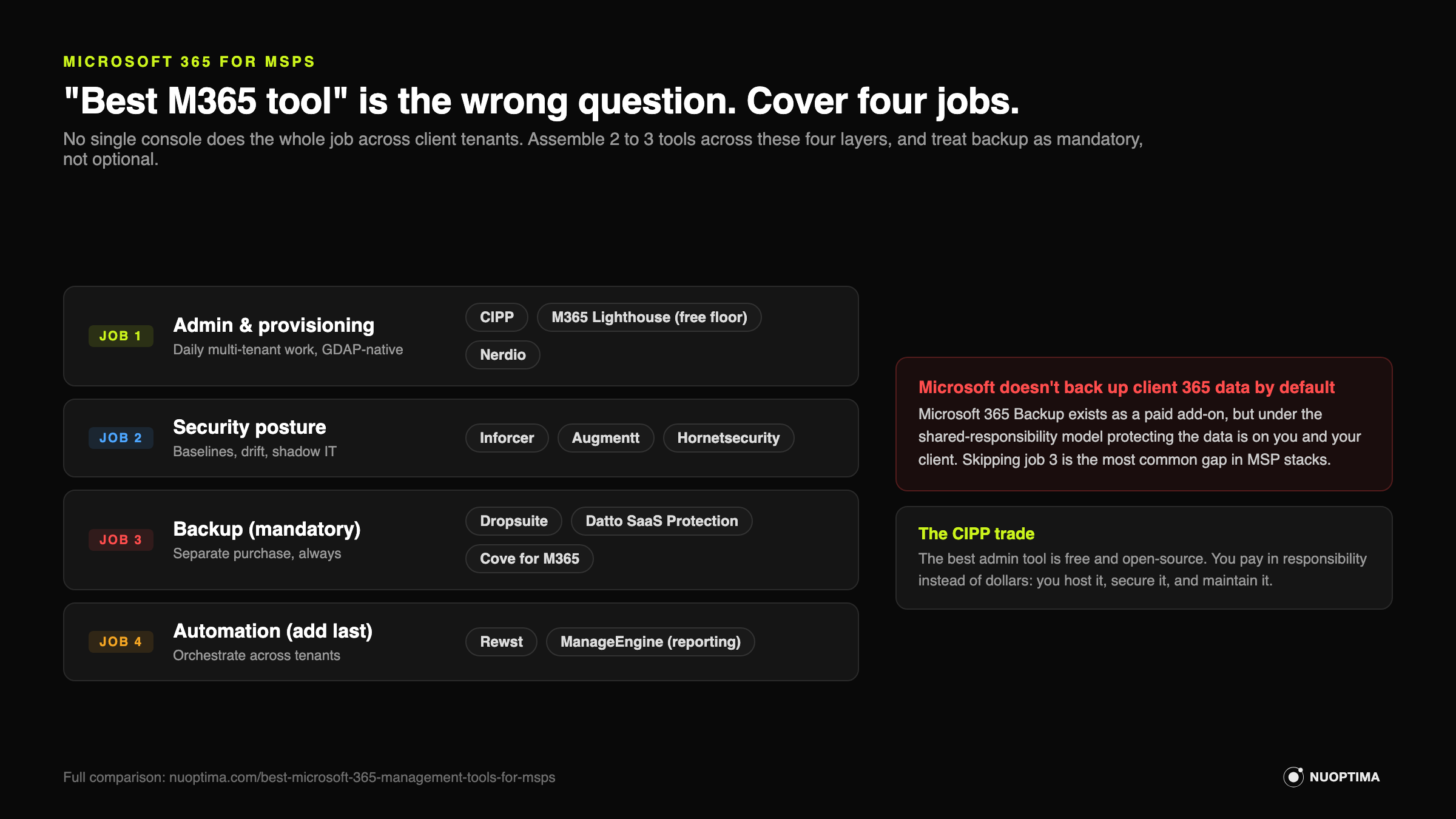
- No single tool does it all. You assemble 2 to 3 tools across four jobs: admin, security posture, backup, and automation.
- The best M365 admin tool is free. You just pay in responsibility instead of dollars. CIPP is the community-leading open-source admin layer, built around GDAP. Self-host it and you own the hosting, security, and maintenance of a portal with delegated access to every client tenant.
- Microsoft 365 Lighthouse is the free native baseline for partners. Good for monitoring and basic remediation, thin next to third-party tools.
- Microsoft does not back up client 365 data by default. Its native Microsoft 365 Backup is a paid add-on covering Exchange, OneDrive, and SharePoint, and under the shared-responsibility model protecting the data is still your job. Third-party M365 backup remains a separate, deliberate purchase.
- GDAP and least privilege are the direction of travel. Legacy delegated admin is on the way out, so pick tools that assume granular, per-tenant access.
- Automation comes last. Orchestration tools like Rewst tie your management actions together once the rest of the stack is in place. They are not a management console on their own.
Microsoft 365 management tools for MSPs compared
| Tool | Category | Best for | Pricing model | Watch-out |
|---|---|---|---|---|
| CIPP | Admin | GDAP-based multi-tenant admin at scale | Free/self-host or hosted plan | You own hosting, security, and upkeep |
| Microsoft 365 Lighthouse | Admin | Native baseline monitoring for partners | Free with partner tier | Limited depth vs third-party tools |
| Nerdio Manager for MSP | Admin | MSPs doing serious Azure and AVD work | Per-user/per-tenant, premium | Overkill if you do little Azure |
| Augmentt | Security | SaaS visibility, shadow IT, license waste | Per-tenant/per-seat subscription | Visibility-led, lighter on enforcement |
| Inforcer | Security | Security baseline and policy enforcement | Per-tenant/per-seat subscription | Newer vendor, config discipline required |
| Hornetsecurity 365 Multi-Tenant Manager | Security/Backup | One vendor across several jobs | Per-seat subscription/partner tier | Suite lock-in, depth varies by module |
| Dropsuite / Datto SaaS / N-able Cove | Backup | Mandatory third-party 365 backup | Per-seat subscription | Test restores, not just backup status |
| ManageEngine M365 Manager Plus | Automation/Reporting | Compliance and audit reporting | Per-user/mailbox tiers; free to 25 users | Reporting-heavy, not a live admin layer |
| Rewst | Automation | Orchestrating M365 actions across tenants | Per-endpoint/partner subscription | Build effort up front; add it last |
Multi-tenant admin and provisioning
This is the layer you live in daily: creating users, applying settings, and running actions across every tenant without opening each one. Start here.
 CIPP
CIPP
CIPP (the CyberDrain Improved Partner Portal) is the open-source multi-tenant M365 admin portal practitioners consistently favor. It is built around GDAP, so it fits the least-privilege direction Microsoft is pushing partners toward, and it lets you run user management, standards, and bulk actions across every client tenant from one interface.
Strengths: Free and open-source, with an active community shipping features fast. Deep multi-tenant coverage, strong standards and templating, and GDAP-native access. When you want to enforce the same config across 200 tenants, this is the tool most operators reach for.
Where it falls short: Free is not the same as no cost. You either self-host CIPP (and own the security, patching, and uptime of an instance that holds delegated access to every client tenant) or you pay for the hosted plan. Either way the operational responsibility is yours. Misconfigure the hosting and you have created a serious attack surface. Paid tools trade money for support and lower maintenance; CIPP trades money for control and self-reliance.
Best for: MSPs comfortable running their own infrastructure who want maximum control and no per-tenant license fees.
 Microsoft 365 Lighthouse
Lighthouse is Microsoft's own multi-tenant management portal for partners. It is free with the partner tier and gives you a single pane for monitoring tenant health, pushing basic security baselines, and doing light remediation across clients.
Strengths: Native, free, and supported by Microsoft, so there is no third-party instance to secure. It reads well as the baseline monitoring layer, surfaces at-risk tenants, and handles common remediation without extra spend. If you want a starting point that ships with your partner status, this is it.
Where it falls short: Depth. Lighthouse covers the common cases and stops. Practitioners who run large or complex fleets consistently find it thinner than CIPP or paid security tools once they need granular policy control, broad automation, or reporting beyond the basics. Treat it as the floor, not the whole building.
Best for: Every partner as a free baseline, and smaller MSPs who want native monitoring before adding third-party layers.
 Nerdio Manager for MSP
Nerdio is a management and automation platform aimed at MSPs running Azure, Azure Virtual Desktop, and M365 lifecycle work. It is strongest where virtual desktops and Azure cost management meet day-to-day tenant administration.
Strengths: The strongest option for AVD and Azure work, with cost optimization, auto-scaling, and packaging that saves real hours if virtual desktops are a meaningful part of your book. It also handles M365 user lifecycle and provisioning, so it can serve as an admin layer for shops already committed to Azure.
Where it falls short: It is premium, and the value concentrates around Azure and AVD. If you do little virtual desktop work, you are paying for a platform whose center of gravity sits away from plain M365 administration. Match the spend to how much Azure you actually run.
Best for: MSPs with serious Azure and AVD workloads who want lifecycle management and cost control in one place.
Security posture and baselines
Admin tools change settings. Security tools tell you whether those settings are safe, keep them from drifting, and flag what your clients are actually doing in their tenants.
 Augmentt
Augmentt focuses on SaaS and M365 visibility: what apps clients use, how licenses get consumed, and where security posture is weak across tenants. It is built to surface the things you cannot see from the admin console alone.
Strengths: Strong at spotting shadow IT and license waste, which turns into both security wins and margin. Discovering unsanctioned SaaS and reclaiming unused licenses gives you concrete numbers to take to a QBR. Good posture monitoring across a fleet.
Where it falls short: It leans toward visibility and reporting rather than heavy, opinionated enforcement. You still need a plan (and often another tool) to act on what it shows you. Treat it as the eyes, not the hands.
Best for: MSPs who want SaaS discovery, license optimization, and posture visibility across many tenants.
 Inforcer
Inforcer manages M365 security baselines and enforces policy across tenants, with backup features layered in. It is aimed squarely at the problem of standardizing security config at scale and stopping it from drifting tenant by tenant.
Strengths: Fast-growing for a reason. It lets you define a security baseline once and push, monitor, and enforce it across the fleet, which is exactly the pain when every client tenant has slightly different settings. Policy templating and drift detection are the core wins, and the backup features add coverage.
Where it falls short: It is a newer vendor, so you are betting on a younger roadmap and support organization than the incumbents. Enforcement is only as good as the baselines you define, so it rewards config discipline and punishes sloppy setup. Do not treat the backup features as a full replacement for a dedicated backup tool without testing restores.
Best for: MSPs standardizing security baselines across many tenants who want enforcement, not just visibility.
 Hornetsecurity 365 Multi-Tenant Manager
Hornetsecurity offers a broader suite that spans management, security, and backup in one vendor relationship. The multi-tenant manager pulls those jobs into a single console aimed at partners.
Strengths: One vendor across several jobs. If you would rather consolidate management, security, and 365 backup under a single contract and support line than stitch together three tools, this is a clean path. Useful for MSPs who value fewer vendors over best-of-breed in every category.
Where it falls short: Suite consolidation means accepting that not every module is the deepest option in its category, and it means vendor lock-in. If one part of the suite underperforms, you are still inside the same contract. Weigh the convenience against the depth you would get from specialist tools.
Best for: MSPs who want to reduce vendor count and run management, security, and backup through one provider.
Backup
Backup is a separate need, and it is not optional. Microsoft runs the infrastructure; protecting the data inside your clients' tenants is your job.
Third-party M365 backup (Dropsuite, Datto SaaS Protection, N-able Cove)
Microsoft's shared-responsibility model means the data in Exchange Online, SharePoint, OneDrive, and Teams is the customer's responsibility, which in practice makes it yours. Retention policies, geo-redundancy, and the recycle bin are not backup. If a client deletes the wrong thing, gets hit by ransomware, or leaves after an offboarding gone wrong, native tools will not reliably bring the data back.
This job gets a full treatment in our BCDR article, so we keep it short here: pick a dedicated third-party 365 backup tool and put every client tenant on it. Dropsuite, Datto SaaS Protection, and N-able Cove for Microsoft 365 are three options MSPs commonly run. They cover the core M365 workloads on a per-seat model.
Strengths: Independent copies of client data you actually control, with granular restore. This is table stakes for both security and contract defensibility.
Where it falls short: The real risk is treating a green backup dashboard as proof. Backups that never get restore-tested are a false sense of security. Test restores on a schedule, not just when something breaks.
Best for: Every MSP, on every tenant, no exceptions.
Automation
Automation is the last layer, not the first. Once your admin, security, and backup layers are in place, orchestration ties their actions together so routine work runs without a technician clicking through consoles.
 ManageEngine M365 Manager Plus
ManageEngine M365 Manager Plus is a reporting, auditing, and management tool built for depth in compliance and oversight. It is heavier on reporting and audit trails than on live day-to-day administration.
Strengths: Strong when compliance and reporting are the driver: detailed audit logs, scheduled reports, and management actions that satisfy documentation requirements. If clients or regulators want evidence, this produces it.
Where it falls short: It is reporting-heavy, and it is not the live multi-tenant admin layer that CIPP or Lighthouse give you. Buying it to replace your admin console is the wrong fit. Buy it for the reporting and audit job it is actually good at.
Best for: MSPs with compliance-driven clients who need thorough M365 reporting and audit trails.
 Rewst
Rewst
Rewst is an automation and orchestration platform that connects M365 actions to your PSA and RMM, so processes like onboarding, offboarding, and cross-tenant changes run as workflows instead of manual steps. It is the layer that makes the rest of your stack move on its own.
Strengths: Ties tools together across tenants and systems, which is where the real time savings live once you have more than a handful of clients. Onboarding and offboarding automation alone can pay for it. Strong community of prebuilt workflows to start from.
Where it falls short: It is not a management console. Rewst assumes you already have the admin, security, and backup layers it orchestrates. There is real build effort up front, and it rewards MSPs with enough process maturity to know what they want automated. Add it last, once the rest of the stack is settled.
Best for: MSPs ready to automate onboarding, offboarding, and cross-tenant workflows across their existing tools.
For larger or enterprise-leaning shops, CoreView is worth a look for governance-heavy M365 management, and MSP Easy Tools covers a range of lightweight automation scripts. Both are alternatives rather than core recommendations for most MSPs.
How to build your M365 management stack
The order matters more than the brand names. Build it in layers:
Most MSPs end up running 2 to 3 tools, not one. If a vendor tells you their single console does all four jobs equally well, check where the depth actually is before you sign.
Related guides
This guide is part of the Ultimate Guide to the MSP Tech Stack. Continue with the other layers of the stack:
- Best RMM Software for MSPs
- Best PSA Software for MSPs
- Best AI and Automation Tools for MSPs
- Best BCDR and Backup Tools for MSPs
About NUOPTIMA
NUOPTIMA is an AI-native growth agency built for MSPs. We combine traditional SEO with GEO (generative engine optimization), so your MSP shows up both in Google and in the answers buyers now get from ChatGPT and other AI tools when they ask who to hire. Cortavo, a $7M MSP, went from 261 to 10,000 organic visitors a month in 9 months.
If you want to see where your MSP stands today, we run a visibility teardown: a short read on how you show up in search and in AI answers, and the gaps worth closing first. No pitch, just the picture. Reach out when you want to know what buyers see when they look for an MSP like yours.